Jun 10 2013

Email Spoof For Fun Only

PHP / HTML script

This method is easy to use if you have your own hosting space (ie you have a website).  This works on a few hosting sites I tested.  Thanks to Sethioz for some of the code.

This basically sets up a form where you enter the fake email address, subject, and who you want to send it to.  The form then uses a script to actually send it.

NOTE: SMTP and PHP have to be supported.

These should be in the same folder.  Create a folder in your server.  Many sites use cPanel.  If so you  can go to the file manager and create new folder.  Now create two new files:

Name one index.html and the other spoof.php


put this code in index.html:

 <form action="spoofer.php" method="GET">
 <p>To Email: <input type="text" name="email" /></p>
 <p>Subject: <input type="text" name="header" /></p>
 <p>From Email: <input type="text" name="fake" /></p>
 <p>Email Message: <textarea name="message"></textarea></p>
 <p><input type="submit" value="Send Email"></p>
 </form>


Save it and put this code inside spoofer.php:
<?php
 if (!isset($_GET[email]) || empty($_GET[email]))
 {
 echo "TO field is empty";
 exit;
 }
 else
 {
 $to = $_GET[email];
 }
 if (!isset($_GET[header]) || empty($_GET[header]))
 {
 echo "Subject is missing";
 exit;
 }
 else
 {
 $subject = $_GET[header];
 }
 if (!isset($_GET[fake]) || empty($_GET[fake]))
 {
 echo "FROM email address is missing";
 exit;
 }
 else
 {
 $fake = $_GET[fake];
 }
 if (!isset($_GET[message]) || empty($_GET[message]))
 {
 echo "email message box is empty";
 exit;
 }
 else
 {
 $message = $_GET[message];
 }
 $headers = "MIME-Version: 1.0" . "\r\n";
 $headers .= "Content-type:text/html;charset=iso-8859-1" . "\r\n";
 $headers .= "From: " . $fake . " <" . $fake . ">" . "\r\n";
 if (mail($to, $subject, $message, $headers))
 {
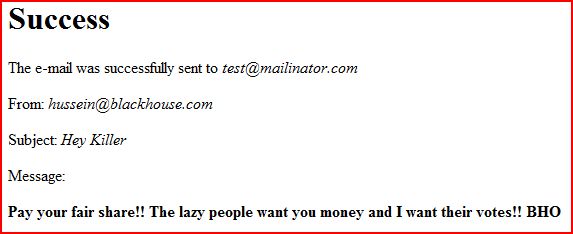
 echo"<h1>Success</h1>\n";
 echo"<p>The e-mail was successfully sent to <i>" . $to . "</i></p>\n";
 echo"<p>From: <i>" . $fake . "</i></p>\n";
 echo"<p>Subject: <i>" . $subject . "</i></p>\n";
 echo"<p>Message:</p>\n";
 echo"<p><b>" . $message . "</b></p>";
 }
 else
 {
 echo"<h1>Error!</h1>\n";
 echo"<p>The mail() function failed.</p>";
 }
 ?>


Capture

Now save that and go to your site where you created the folder. For example, www.mysite.com/spoofedemail/ You should see the form pop up. Now test it on your address. Please note, your real address will show up in the header and anyone with more than cursory computer knowledge will know how to see that.
Capture2

Final Note: use at your own risk. This site nor anyone else is responsible for anything stupid you do with this script.

May 25 2013

Don’t Be A Money Mule – You Will Be Prosecuted

Credit Union Members Nationwide Recruited as Money Mules

A number of credit unions across the country have reported that their members are being recruited as money mules by fraudsters. Money mules unknowingly assist fraudsters in laundering stolen funds. The source of the stolen funds received by the money mules is often from account takeovers at other financial institutions through online banking systems. Money mules are most often recruited through bogus job offers for payment processors, financial managers, or overseas representatives. Continue reading


Apr 13 2013

WordPress Admin Page Being Redirected Due To Brute Force Attempts

Some idiots are always trying to brute force all WordPress pages by attempting to login as “admin.”  Rather than reinvent the wheel, Immotion explains it pretty well:

What is a Brute Force Attack?

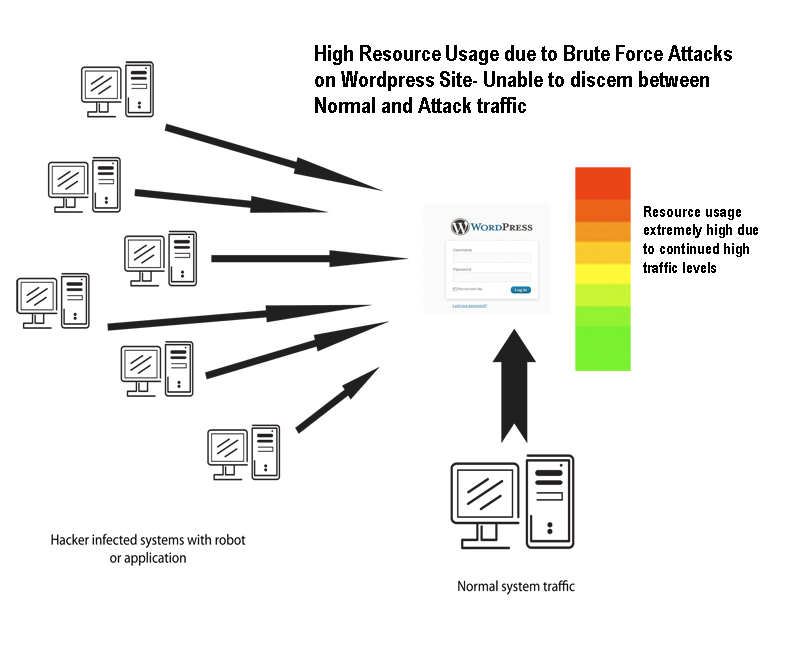
One of the methods to gain information -primarily LOG-IN information – is by using a method called BRUTE FORCE attack.  Basically, as the name suggests, they are not hiding the attack, and there’s no efficiency to the attack. You could say it’s like taking the “shotgun approach.”  It simply is hitting the server looking for one thing, the correct login information for your WordPress site.  Hackers will often infect other computer systems and then set them to attempt logging into the WordPress Administrator.  The illustration below shows graphically how the attack traffic can come from many locations and be mixed with normal website traffic.  The attack can also come from just one location, but the method of trying to crack the login is the same – it is simply going through a sequential search for your login.  Brute force attacks can also increase resource usage of the website.  Therefore, brute force attacks are not only trying to crack through your security, but they are also driving up resource usage when multiple attempts on the WordPress login is occurring.


brutef


Preventing WordPress Brute Force Attacks

Since users are no longer using WordPress as simply a blogging solution, there isn’t as much emphasis on user management for the owners of the WordPress site.  And this may also be a contributing factor to the problem.  WordPress Site Administrators should regularly cycle their passwords and review their user lists to make sure that no one has been added that isn’t supposed to be on the list. Especially users added as Administrator-level users.  There are also WordPress sites that do not require that people register to post comments or other actions on the website. To prevent unauthorized access we recommend the following:

  • Block access to the WP-LOGIN.PHP  using the HTACCESS file by requiring an additional password
  • Block access to the WP-LOGIN.PHP using the HTACCESS file by allowing only specific IP address or range of IP addresses
  • Find a plugin that prevents access to the login screen after a particular number of tries.  The plugin should then use an interval of inaccessibility before the next attempt to login would be allowed.


The first two methods using .htaccess are recommended as they will help to prevent excessive resource usage. There is no guarantee of this with the plug-in, unless the plugin can limit access no matter how many times login attempts are being made.  The following information are examples of the code solutions for the .htaccess file as listed above.  You get to .htaccess using Cpanel interface that all hosts provide.  Use the “file manager” to find it then use their “code editor” to add the code.

_cpanelFM


.HTACCESS method to deny user login using specific IP address or range of IP addresses:

Note:The below code needs to be in the .htaccess file located in the WP-ADMIN folder. If you don’t see one, then create a blank text file and name it .htaccess saving it in the wp-admin folder

AuthUserFile /dev/null
AuthGroupFile /dev/null
AuthName “Admin Access Only”
AuthType Basic
<LIMIT GET>
order deny,allow
deny from all
# whitelist Admin 1 IP address
allow from xx.xx.xx.xxx
# whitelist Admin 2 IP address
allow from xx.xx.xx.xxx
</LIMIT>
————————————————–
Another hosting company gave me this and it works on this site using it in the .htaccess I had to create.  Replace Xs with your IP address which you can get from Whatsmyipaddress.com:

<Files ~ “^wp-login.php”>
Order deny,allow
Deny from all

Allow from xx.xx.xx.xx
</Files>

—————————————————————————————————————————
You can add more IP addresses by adding an additional Allow from xx.xx.xx.xx to the code above.
—————————————————————————————————————————

.HTACCESS method to deny user login using additional password for wp-login access:


Note:The code below would be in the .htaccess file located in the .htaccess file located where you have installed WordPress.  If you don’t see one, then create a blank text file and name it .htaccess


<FilesMatch “\.wp-login.php$”>
AuthName “WordPress”
AuthType Basic
AuthUserFile /home/username/.htpasswd
Require valid-user
</FilesMatch>

———————————————————

Some other common sense things to do to secure your WordPress site

Delete the ‘admin’ account

The default Administrator account on WordPress has a username of ‘admin’. Everyone knows that so don’t use it.  Create another user with admin privileges.  Login with that name to make sure it works and then delete the “admin” user.

Go into the Dashboard » Users » Add New User screen. Create a new user with the role of Administrator. Now log out, and log back in as the new user.

Go to the Users screen again and delete ‘admin’. You can transfer all of the content created by ‘admin’ to your new user account before confirming deletion.

I recommend the plugin “WP Security Login Notification” too.  It will tell you when there are failed login attempts.


Feb 14 2013

Edit Source Code In Firefox (with add-on)

Firefox doesn’t allow you to edit source code directly.  It’s quick and easy using and add-on versus opening Notepad or something else.

Internet Explorer automatically let’s you do it, but you will need an Add-on for Firefox. Go to the add-on home page and search for Dafizilla ViewSourceWith. There may be others too.  This one puts a small icon up near the address bar for quick access.  Set it up to use your favorite editor (I use Notepad++).


Some pages don’t seem to work though. Ill keep testing it.


Jan 2 2013

Specify Starting Point On Youtube or Google Video

Both Youtube and Google will let you share it or embed the code which gives you a link like this http://www.youtube.com/watch?v=Y4xb8ILonoI

If you do not want it to start at the beginning, you can add #t=XmYs to the end.  Where X = minutes and Y = seconds.  If I wanted to start the above video 1 minute and 2 seconds into it, the link would look like this:

http://www.youtube.com/watch?v=Y4xb8ILonoI#t=1m2s

The links are active if you want to see what it does just click them.  This is handy for skipping unwanted parts of a video.


Aug 18 2012

Host File Location (Vista)

1) Browse to Start -> All Programs -> Accessories
2) Right click “Notepad” and select “Run as administrator”
3) Click “Continue” on the UAC prompt
4) Click File -> Open
5) Browse to “C:\Windows\System32\Drivers\etc”
6) Change the file filter drop down box from “Text Documents (*.txt)” to “All Files (*.*)”
7) Select “hosts” and click “Open”
8) Make the needed changes and close Notepad. Save when prompted.

Google this if you dont know what you can do with your HOST file.