Nov 21 2016

PDF Search Not Working

If your Adobe PDF search does not seem to work and you are sure it has text as opposed to graphics, this usually works:

Download the free Foxit PDF reader – https://www.foxitsoftware.com/products/pdf-reader/

Open your PDF, highlight some text (any text).  I highlighted something in the copyright area.

Save the PDF, then open in Adobe.  You should have functioning search ability now.


Dec 24 2015

WordPress core dump files

Core dump files WordPressA couple of weeks after I launched a new blog, I noticed four ‘core’ files named core.2801, core.4065 etc. in its directories. The files seemed harmless, but had rather large size (several megabytes).

What are core dump files?

A quick Google search turned up a lot of complicated pages explaining the problem, but none that could actually suggest a fix.

A web developer suggested that the core files were a result of lots of buffer being dumped. This is typical of excessive resource usage and/or error reporting. Core dumps contain reports of working memory of a software when it has crashed. In short, core dump files are caused by a crashing software component. Instead of trying to get rid of core files, you should worry about what caused these errors.

You can safely delete these files. Although there is GDB to open and analyze core files, not many would actually understand anything. WordPress is tested thoroughly before each release, hence it is unlikely a fault caused by WP.

Prevent core dump files

You can delete core files without any worry – it does not contain data useful to anyone but developers and hosting company itself.

Incompatibilities arising out of Apache, MySQL, PHP etc could cause core dumps. Google version number of these software along with the terms “incompatibility WordPress”.

If possible, use only plugins written by experienced developers. New developers may not adhere to the best coding practices. A poorly coded plugin could cause core dumps.

Upgrade WordPress plugins to the latest version. Regarding the problem on the new blog, I found that I had uploaded a older versions of a couple of plugins.

Disable plugins. You can start out by disabling all the heavy plugins and enabling them one by one, during which time you should watch blog directory, wp-admin etc. for core files. If a plugin does not trigger core files, activate another and test. Repeat the process until all plugins have been activated or the culprit has been found.

The core dumps could also have been due to WP. The most usual cause of a core dump is because of running out of memory on your server – if you’re on a shared host, ask to be moved to a different node. If you’re on a VPS/Dedicated Server, up your memory a little and the problem should stop.
Plugins that send large amounts of data may also cause this.  For example, some idiots keep trying to brute force my admin login and I had it set to send an email on all failed logins.  I had to install a new plugin because it was sending out so many emails it hit the max limit on my hosting service.  The new plugin restricted the login attempts to 5 and then blocks them after that.  This solved my problem, I just had to go delete all the .core files dumped into my folder.

Jul 2 2013

Xbox Hotel Connection

http://www.360tuneup.com/guides/hotel.asp

The hotel connection was so bad I was not able to download a map.


Jun 15 2013

How to Create a Private BitTorrent

These are dark days for BitTorrent. Using it leaves you open to fake torrents, viruses, an ISP that throttles your connection, and media companies that snoop to see what you’re downloading. If you want to avoid all that, you can create an uber-private BitTorrent community that only you and your friends can access. Here’s how.

You’re open to these problems because most BitTorrent trackers allow anyone to come in and share files (a BitTorrent tracker, for those that don’t remember, is the server that connects you with other BitTorrent users in order to download files). Those other people could include virus spreaders, snoopers, and other untrustworthy folk. While joining a private tracker can help, many users feel they aren’t private enough—after all, if you can get an invite, can’t anyone?

What You’ll Get: A Tracker Only Your Friends Can Join

You can do a lot of things to protect yourself, but why go through all that trouble? Between you and your best friends, you probably have a pretty solid collection of media and other files you could share without the need for other, less secure parties. We’ve shown you how to share your own files using BitTorrent, but if you want a bit more privacy, you can create your own BitTorrent tracker right on your home computer.

When you’re done with this process, you’ll have a (admittedly primitive) BitTorrent tracker running on your PC, sharing your files through torrents you create. Send those torrents to your friends, and they can download the files directly from you, without any other parties snooping. If your friends share their files too, you can pool your torrents together in a shared Dropbox folder (or something similar) and have a pretty sizable library of stuff to download, without the need for other unsafe channels. Continue reading


Jun 14 2013

WordPress Allow Comments Checkbox Missing

Has your “Allow Comments” check box gone away for some reason?  You can go to “screen options” near the top right of the “edit post” or “edit page” page.  There are several options there, but the “discussion” one will bring your check box to allow comments or not.  You can also see in under “All Posts” then “Quick Edit” regardless of the “discussion” box status.


Jun 12 2013

Modify Windows Autoplay Menu

How To Add Programs To The Windows Autoplay Menu

When you put a DVD movie in your computer, Windows (Vista in this case) should pop open a menu asking you what you want to do.  This menu should contain a few different programs depending on what you have installed on your computer.  Lets say you had DVDFab as an option to copy and backup any DVD movies you insert.  For some reason, this option disappears (you upgraded the version etc).  This sometimes happens.

Now for the part that probably brought you here. I have not made a program or script to automate this yet so you will have to make changes to the registry by hand.  This is not complicated, but if you don’t even know what the Registry is, you probably should have someone help you.  There are programs that can do something like this as well.  I didn’t want to install anything or pay for anything that could be done with a simple registry tweak.  I will try to keep it simple so anyone very familiar with this will have to put up with it.  Before making changes, you should back up your Registry.

Ill be doing this with Vista, but it should be similar for the Windows 7 etc.  If not, search for your Windows version.  Click the pictures for a larger version.

Lets open the Registry Editor.

Click Start (or Windows pearl icon)PearlCapture


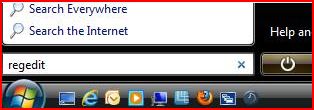
In the “Run” or “Search Box” type REGEDIT then hit Enter.
regeditcommand

Continue reading