Modify Windows Autoplay Menu
How To Add Programs To The Windows Autoplay Menu
When you put a DVD movie in your computer, Windows (Vista in this case) should pop open a menu asking you what you want to do. This menu should contain a few different programs depending on what you have installed on your computer. Lets say you had DVDFab as an option to copy and backup any DVD movies you insert. For some reason, this option disappears (you upgraded the version etc). This sometimes happens.
Now for the part that probably brought you here. I have not made a program or script to automate this yet so you will have to make changes to the registry by hand. This is not complicated, but if you don’t even know what the Registry is, you probably should have someone help you. There are programs that can do something like this as well. I didn’t want to install anything or pay for anything that could be done with a simple registry tweak. I will try to keep it simple so anyone very familiar with this will have to put up with it. Before making changes, you should back up your Registry.
Ill be doing this with Vista, but it should be similar for the Windows 7 etc. If not, search for your Windows version. Click the pictures for a larger version.
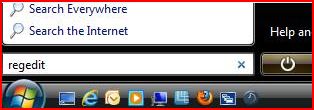
Lets open the Registry Editor.
Click Start (or Windows pearl icon)
In the “Run” or “Search Box” type REGEDIT then hit Enter.