Mozilla Firefox Update Tab Keeps Starting
I had updated Firefox and had this issue. It was annoying to see the update tab start every time. There are a couple of reasons this may happen. First, check the obvious, did you accidentally make it your homepage (ie where Firefox starts)?
This was not the case with me. In my case the preferences file had been corrupted somehow. I am not sure how this happened as it was a new machine.
FYI, This will remove all your custom settings and settings for many extensions.
Locate and delete a file called “prefs.js.” I just renamed it then deleted it later.
At the top of the Firefox, click the HELP menu and select Troubleshooting Information. The Troubleshooting Information tab will open and click the button SHOW FOLDER.
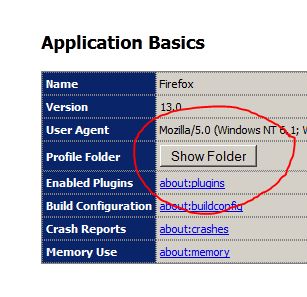
A folder with your profile files will open. Also delete the “prefs.js.moztmp” file if you have one. You will need to delete all “prefs-?.js” files (where ? is a number) as well. Mine was “prefs-2.js” for example. If it exists, delete “Invalidprefs.js” also.
Now restart Firefox and it will create a new “pref.js” file for you and the problem should be gone.
If this did not work for you, try some other options: Firefox Link #1 or Firefox Link #2
